
If you’re like me, you’ve probably spent hours reading on a Kindle and thought, “It’d be great if I could take notes or scribble ideas right here.”
That’s exactly what got me curious about Amazon’s latest upgrade: a Kindle that finally lets you write.
In this blog, you’ll get a clear idea of how it performs in real use, from note-taking and display quality to everyday practicality.
By the end, you’ll know whether the Kindle Scribe is just another gadget or the all-in-one reading and writing device you’ve been waiting for.
What is the Kindle Scribe?
The Kindle Scribe is Amazon’s first Kindle that lets you read and write on the same device. It’s designed for individuals who enjoy ebooks and also want to take notes, sketch, or mark up documents directly on the screen.
It has a large, sharp display that’s easy on the eyes and feels close to writing on paper. The included pen doesn’t need charging and works naturally for quick notes or drawings.
You can organize notebooks, edit PDFs, and send files straight from your computer. Everything syncs through the cloud, so your books and notes stay updated across all Kindle apps.
It supports common file types, such as PDFs and Word documents, giving you the feel of paper with the convenience of digital storage.
Kindle Scribe Review
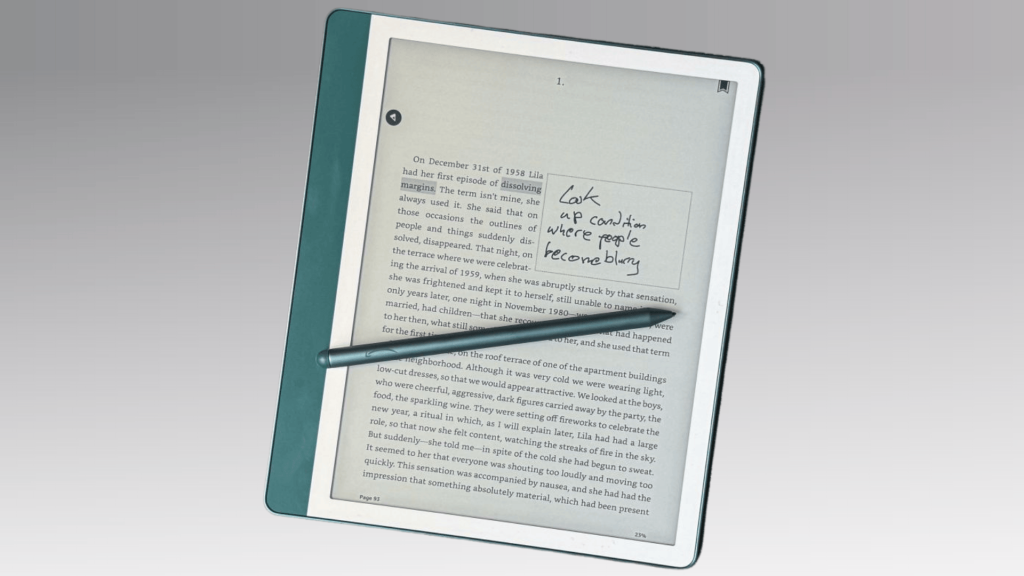
The Kindle Scribe combines the comfort of a Kindle with the function of a digital notebook.
1. Design and Build Quality
- Design: Modern and minimalist, blending the feel of a lightweight tablet with the sturdiness of a notebook. Easy to carry and comfortable for long use.
- Display and Weight: The 10.2-inch screen offers plenty of room for reading or writing. At about 433 grams, it’s light enough for one-handed use.
- Grip and Comfort: The asymmetrical bezel provides a natural grip similar to the Kindle Oasis, allowing long reading or writing sessions without fatigue.
- Build Quality: The metal chassis feels solid and premium, with a matte texture that reduces fingerprints and adds a clean, professional touch.
- Durability: Though not waterproof like the Oasis, it resists scratches and holds up well in daily use.
- Pen and Accessories: The pen magnetically attaches to the side, making it easy to store and grab whenever needed.
- Portability: Slim and travel-friendly, it fits easily in a backpack or tote despite its larger screen size.
2. Display and Reading Experience
- Display Quality: The Kindle Scribe’s screen is crisp, paper-like, and easy on the eyes, even during long reading sessions.
- Sharpness and Clarity: The 10.2-inch, 300 ppi Paperwhite display delivers sharp text and detailed images that look like real ink on paper.
- Matte Finish: The matte surface minimizes reflections, helping you stay focused on the content—perfect for novels, reports, or handwritten notes.
- Brightness and Warmth: You can manually adjust or automate brightness and color warmth, making it comfortable to read in any lighting.
- Glare-Free Reading: The anti-glare coating keeps the display clear even outdoors, so there’s no need to squint or reposition the device.
- Performance: Page-turn speed is faster than older Kindles, with text and images loading instantly for a smooth reading experience.
- Writing Responsiveness: Handwritten notes and annotations appear naturally, with almost no delay, giving a fluid, real-paper feel.
3. Writing and Note-Taking Experience
- Writing Experience: The Kindle Scribe stands out for its natural, quiet, and responsive writing feel—similar to using a fine-point pen on paper.
- Premium Pen: The included pen feels balanced and solid, attaches magnetically to the device, and doesn’t need charging for continuous use.
- Precision and Sensitivity: The tip reacts instantly with adjustable line thickness and pressure sensitivity, making it ideal for neat handwriting or quick sketches.
- Paper-Like Texture: The matte surface adds gentle resistance, closely mimicking the feel of real paper and making writing satisfying and comfortable.
- Low Lag: There’s almost no delay when writing or drawing, which keeps note-taking and annotations smooth and consistent.
- Organization Tools: You can create notebooks, folders, and tags to organize content easily within the device.
- Cloud Syncing: Notes sync automatically to your Amazon account, allowing you to access or export them anytime.
- Send-to-Kindle Feature: Documents can be imported for annotation and emailed back with your notes, keeping everything stored and accessible across devices.
4. Software, Features, and Updates
Amazon has greatly improved the Kindle Scribe with recent updates. The March and April 2025 firmware releases added recap views, customizable notebook summaries, and smoother navigation.
You can now sync handwritten notes to Microsoft OneNote and access them through the Kindle app on multiple devices. It supports PDFs, DOCX, TXT, and image files, letting you write directly on PDFs or convert notes to text.
These upgrades make it ideal for editing, reviewing, or signing documents on the go.
5. Performance and Battery Life
- Overall Performance: The Kindle Scribe delivers smooth, reliable performance with no lag during reading, writing, or switching between screens.
- Processor Speed: Its dual-core processor handles large PDFs and multitasking efficiently, though it’s not meant for streaming or web browsing.
- Battery Life: Expect 10–12 weeks on a single charge with light reading (around 30 minutes daily). Even with regular writing or Wi-Fi syncing, it still lasts several weeks.
- Real-World Use: You’ll rarely need to charge it—most users can go weeks without plugging it in.
- Charging Time: Fully charges in about 2.5 hours via USB-C, making top-ups quick and convenient.
- Standby Mode: Extremely power-efficient when idle, so you can leave it unused for days and return to it without losing charge.
6. Ecosystem and File Management
Amazon’s ecosystem makes the Kindle Scribe highly convenient for existing Kindle users. You can access millions of titles from the Kindle Store, with support for formats like MOBI, AZW3, and converted EPUBs.
Books download instantly and sync to your account. Using the Send-to-Kindle tool or email, you can easily import or export PDFs and notes, which can also be opened in OneNote or the Kindle app.
While it doesn’t support every file type, simple conversions fix most issues. The Scribe blends comfortable reading with natural digital writing, offering a focused, human-like experience without trying to replace a tablet.
Kindle Scribe vs. Competitors
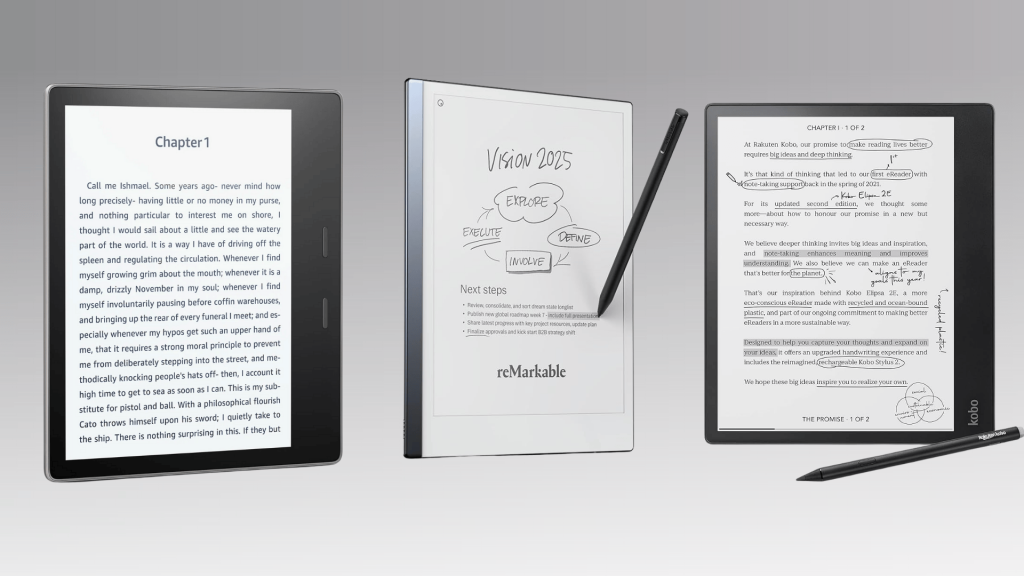
The Kindle Scribe faces strong competition from other e-note devices and premium e-readers. Each option brings something unique, from smoother writing to better portability or reading comfort:
| Feature | Kindle Scribe | Kindle Oasis | reMarkable 2 | Kobo Elipsa 2E |
|---|---|---|---|---|
| Display | 10.2” 300 ppi Paperwhite | 7” 300 ppi | 10.3” CANVAS display | 10.3” 227 ppi E Ink |
| Writing Support | Yes (stylus included, no charging) | No | Yes | Yes |
| Lighting | Adjustable warm backlight | Adjustable warm light | No built-in light | ComfortLight PRO (adjustable) |
| Build & Weight | Metal chassis, ~433g | Lighter and compact, ~188g | Slim design, ~403g | Slightly lighter, ~390g |
| Water Resistance | No | Yes (IPX8) | No | No |
| File Support | PDFs, DOCX, TXT, images, Kindle formats | Kindle formats | PDFs, ePUBs | ePUBs, PDFs |
| Cloud & Sync | Amazon Cloud, OneNote, Kindle App | Amazon Cloud | Google Drive, Dropbox | Kobo Cloud, OverDrive |
| Battery Life | 10–12 weeks (light use) | 6 weeks | 2 weeks | 3–4 weeks |
Price and Valuefor Money
The Kindle Scribe costs more than standard Kindles, but its handwriting and document tools make it far more versatile.
- The 16 GB model is priced around $299 to $339.99, best for light readers who mainly store books and a few notes.
- The 32 GB model price varies but has been seen at around $325 to $389.99, ideal for users managing larger PDFs or frequent note-taking.
- The 64 GB model pricing is generally higher, around $419.99 or more, suited for heavy users needing maximum storage and performance.
Accessory Quality (Pen and Covers):
Higher-end versions include the Premium Pen, which doesn’t require charging and attaches magnetically to the side.
Amazon’s official covers range from $59.99–$99.99, offering built-in pen holders and auto sleep/wake functionality for convenience.
Kindle Scribe Pros and Cons: A Quick Breakdown
The Kindle Scribe has clear strengths, but it also comes with a few trade-offs.
| Aspect | Pros | Cons |
|---|---|---|
| Display | Excellent reading clarity with a sharp 300 ppi screen | None significant |
| Writing Experience | Natural pen feel and minimal lag | Limited note organization tools |
| Battery Life | Lasts weeks on a single charge | Slightly slower charge time compared to tablets |
| Software & Features | Improved AI tools for summaries and handwriting-to-text | Lacks advanced editing and layout options |
| Ecosystem | Seamless sync with Kindle library and cloud | Locked into Amazon’s ecosystem |
| Price & Value | Premium build and reliable performance | High cost for limited software flexibility |
Overall, the Kindle Scribe performs strongly in reading and writing, but it feels limited by its closed system and software restrictions.
Wrapping Up
If you’ve made it this far in this Kindle Scribe review, you already know how it blends reading comfort with smart note-taking that fits into daily life.
I like how it bridges the gap between an e-reader and a digital notebook, helping you stay organized without needing to juggle extra gadgets.
If you love reading and often jot down thoughts or ideas, the Kindle Scribe could easily become your everyday companion. It’s not perfect, but it’s practical, dependable, and worth considering.
Ready to see if it fits your lifestyle? Try the Kindle Scribe yourself and feel how smooth reading and writing can be in one place!